

Inkjet vs Laser Printer: Which One Should You Buy in 2026?
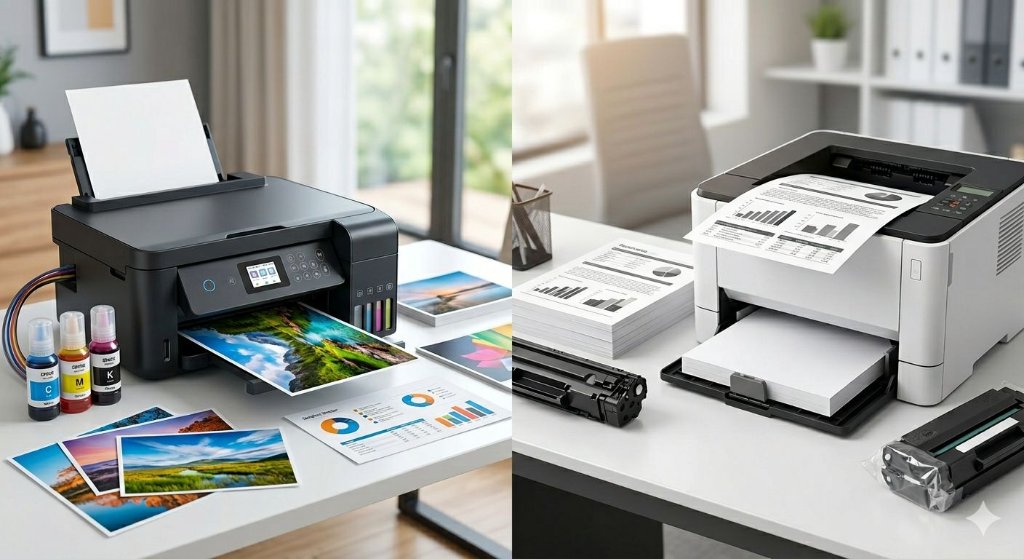
Choosing between an inkjet or laser printer used to be straightforward: inkjets for photos, lasers for documents. But the landscape has shifted dramatically since 2022, with refillable ink tanks and high-yield toner cartridges rewriting the cost equation entirely. This guide breaks down the fundamental difference between inkjet and laser printers, helping you pick the right printer for your actual printing needs. We'll highlight the key differences between inkjet and laser printers, including that inkjet printers are generally cheaper upfront compared to laser printers, though long-term costs may differ.
Introduction to Printers
When you’re searching for the right printer, understanding the basics of how different printer types work is essential. The two most popular options—inkjet printers and laser printers—each use distinct technologies to produce prints. Inkjet printers rely on liquid ink, which is sprayed onto the paper in tiny droplets to create images and text. This method allows for vibrant colors and detailed images, making inkjet and laser printers a common comparison for home and creative use. In contrast, laser printers use a laser beam to form an image on a drum, which then attracts toner powder. The toner is fused onto the paper using heat, resulting in crisp, smudge-resistant prints. Knowing how inkjet printers and laser printers use ink or toner powder can help you decide which printer best matches your printing needs, whether you’re focused on high-quality photos, fast document printing, or cost-effective performance.
Key Takeaways
- Inkjet printers excel at printing photos and creative work with vibrant colours and smooth gradients, while laser printers win for fast print speeds and high volume text printing.
- The core distinction: inkjet printers work by spraying liquid ink through tiny nozzles, whereas laser printers use a laser beam to fuse toner powder onto paper—a dry process with no wet ink.
- For budgets under ~£100/£120 and light monthly use, a colour inkjet is typically ideal. For 500+ pages per month of business documents, a mono or colour laser delivers better cost efficiency.
- Modern refillable-ink inkjets and high-yield toner cartridges launched since about 2022 have slashed cost per page dramatically compared with older cartridge models.
- This article compares print quality, printing speeds, durability, cost effectiveness, cost of ownership, size, versatility, and ease of use, then provides concrete buying scenarios and FAQs.
Inkjet vs Laser: Quick Comparison
This section gives you a fast, at-a-glance comparison so you can decide quickly without reading every detail.
Inkjet printers are best suited for colour photos, creative projects, and mixed home use. They excel in producing smooth gradients, a wide colour gamut, and detailed images. Typical print speeds range from 5 to 15 pages per minute for basic models, with office-class inkjets capable of 20 or more pages per minute. Running costs can be higher when using cartridges, but very low when using tank systems. Inkjet printers are ideal for users with a monthly print volume under 300 pages.
On the other hand, laser printers are designed for text-heavy documents, high volume printing, and office work. They deliver crisp text, sharp lines, and clean barcodes with print speeds typically between 25 and 40 pages per minute for monochrome, and 18 to 33 pages per minute for colour models. Laser printers generally have lower running costs per page, especially for monochrome printing, and are well suited for monthly volumes ranging from 300 to over 3,000 pages.
Choose inkjet if:
- You regularly print colour photos or creative materials
- You need versatility with glossy photo paper, labels, or crafts
- Your monthly volume stays under 200–300 pages
Choose laser if:
- You print documents frequently (500+ pages/month)
- Speed and reliability matter more than photo quality
- You want minimal maintenance and no drying concerns
- For office environments or high-volume document printing, laser printers excel vs inkjet in speed and cost efficiency
How Inkjet and Laser Printers Work
Understanding how inkjet printers work versus laser and inkjet printers helps explain their different strengths in speed, quality, and durability.
Inkjet technology propels tiny droplets of liquid ink—typically 1–10 picoliters in volume—through microscopic nozzles. The print head moves across the page (or spans its full width in page-wide array models), building images pixel by pixel. Inkjet printing is especially known for its superior photo printing capabilities and excellent color reproduction, making it a top choice for high-quality images. Most inkjet printers use either:
- Dye-based inks: Penetrate paper fibres for vibrant hues, ideal for photo printing on glossy media
- Pigment based inks: Sit atop the surface for sharper text and better resistance to water and smudging
Laser technology uses an electrophotographic process. A laser beam scans an electrostatic charge onto a photosensitive drum, attracting fine powder (toner) particles around 8–12 microns in diameter. These particles transfer to paper and fuse via heated rollers at 180–220°C, creating a dry, permanent bond.
Neither technology is universally “better.” Printing a borderless 10×15 cm photo at home? An inkjet delivers smooth gradients. Printing a 50-page monochrome report? A laser produces prints faster with razor-sharp text.
Print Quality and Durability
Both inkjet and laser printers can produce professional-looking output, but they excel in different areas: colour photos versus crisp text and archival document printing.
Inkjet strengths:
- Resolutions reaching 4800×1200 dpi for smooth gradients
- Wide colour gamut covering photo paper beautifully
- Six- or eight-colour inkjet models rival lab prints for albums and wall art
- Lightfastness ratings of 30–100 years on proper photo paper (per manufacturer tests)
Ink types matter:
- Dye inks produce rich, vibrant colour photos
- Pigment black creates sharper text on plain paper
- Pigment inks resist fading better and handle highlighting without smudging
Laser strengths:
- Extremely crisp black text, readable down to 1-point fonts
- Clean fine lines and barcodes without feathering
- Toner doesn’t smudge when highlighted or handled immediately
- Ideal for contracts, legal documents, and archival records
For durability, well-stored pigment-ink or toner prints can last decades. Toner fusing ensures no migration or bleeding, while most inkjet printers using dye inks on plain paper may fade or smear without protection.
Color Options
If color printing is a priority, inkjet printers are often the go-to choice. Thanks to their use of pigment based inks and advanced print heads, inkjet printers excel at printing photos, producing detailed images with rich, vibrant colors on a wide range of paper types—including glossy photo paper and specialty photo paper. This makes them ideal for anyone who values high-quality photo printing or needs to create eye-catching color documents. While laser printers can also handle color printing, their output tends to be less vivid compared to inkjet models, especially when it comes to subtle gradients and photographic detail. However, laser printers shine when you need to produce crisp, clear text and handle high volume printing of color documents efficiently. Ultimately, the choice between inkjet and laser for color depends on whether your main focus is printing photos and creative projects, or producing large quantities of professional-looking documents.
Speed, Volume, and Productivity
For homes printing a few pages weekly, speed hardly matters. But for students, home offices, and small businesses, pages-per-minute and warm up time significantly affect productivity.
Typical inkjet speeds:
- Basic home models: 5–10 ISO ppm black, 3–8 ppm colour
- Office-class inkjet models: 20+ ppm with page-wide print heads
Typical laser speeds:
- Mono lasers: 25–40 ppm with first-page-out under 10 seconds
- Colour lasers: 18–33 ppm
Laser printers tend to handle sustained high volume printing—hundreds of pages in one run—more efficiently than budget inkjets tend to manage. Lasers maintain consistent quality without banding or overheating risks, and laser printers tend to offer greater speed and reliability, making them ideal for business and office environments where efficiency is crucial.
One productivity note: most inkjet printers pause for automatic print-head cleaning after inactivity periods. This consumes extra ink and slows jobs. Laser printers rarely need such interruptions, making them more reliable for high print volumes.
Running Costs and Total Cost of Ownership
The initial purchase price tells only part of the story. Ink costs, toner cartridges, maintenance parts, and energy usage over 3–5 years typically outweigh hardware costs.
Traditional cartridge inkjets:
- Lower upfront costs (often under £60/$70)
- Higher cost per page: 5–10 pence/cents black, more for colour documents
- Frequent replacement of ink cartridges adds up quickly
Tank/refillable inkjets (since ~2019):
- Large reservoirs yielding 6,500+ black pages per bottle set
- Cost per page drops to 0.2–0.5 pence—remarkably cost effective
- Ideal for users wanting colour without laser printers’ limitations
Laser costs:
- Higher upfront price (£150+) but lower running costs
- Mono printing: 1–3 pence per page with standard toner
- High-yield replacement cartridges reduce costs further
- Laser printers use toner powder that never dries out
Consider your monthly volume. Printing 50 pages monthly? A tank inkjet wins. Printing 1,000+ pages of text-heavy documents? A mono laser delivers more prints per pound spent. The choice of a laser printer depends on factors like print quality, speed, and cost-effectiveness, so weigh these criteria against your specific needs.
Size, Noise, and Media Versatility
Physical size, weight, and media flexibility often determine whether a new printer fits your bedroom, shared flat, or crowded office.
Inkjet dimensions:
- Often more compact: many under 40×30×15 cm, weighing around 5 kg
- Portable variants available for travel or events
- Generally quieter at 45–50 dB during operation
Laser dimensions:
- Bulkier: typically 50×40×30 cm or larger
- Heavier at 15–25 kg due to drums and fuser units
- Require ventilation for heat dissipation
- Compact mono lasers for home offices emerged since ~2022
Media support differs significantly:
- Inkjets handle diverse paper types: glossy photo paper, matte art paper, envelopes, iron-on transfers, labels, and CDs up to 300 gsm
- Lasers excel with standard office paper (75–90 gsm) but carry manufacturer warnings for thick photo stock or heat-sensitive materials due to the hot fuser
For crafts and creative work, inkjet counterparts offer far more versatility than laser alternatives.
Environmental Considerations
Environmental impact is an increasingly important factor when choosing between inkjet printers and laser printers. Inkjet printers use liquid ink, which can sometimes lead to waste if cartridges are not fully used or disposed of properly. On the other hand, laser printers use toner powder, which is often easier to recycle, and many manufacturers now offer recycling programs for used toner cartridges. Additionally, both printer types are evolving to include more eco-friendly features, such as energy-saving modes, reduced packaging, and cartridges made from recycled materials. By selecting a printer with these environmentally conscious options, you can help minimize waste and reduce your overall carbon footprint. Whether you choose an inkjet or a laser printer, looking for models that support sustainable practices is a smart way to print responsibly.
Ease of Use, Connectivity, and Features
Modern inkjet and laser printers share many convenience features, but subtle usability differences matter day-to-day.
Common connectivity options:
- Wi-Fi, Wi-Fi Direct, USB, Ethernet (office models)
- Apple AirPrint, Mopria, Chromebook printing support
- Mobile apps for scanning, printing, and maintenance
Multifunction capabilities:
- Inkjet all-in-ones dominate homes: printing, scanning, copying
- Laser MFPs popular in offices: add automatic document feeders and secure PIN printing
Usability features to look for:
- Colour touchscreens and guided app setup
- Auto duplex (double-sided) printing mono and colour
- Quiet or night modes for shared spaces
Maintenance considerations:
- Inkjet users may need occasional printhead cleaning to prevent clogging if the printer sits idle
- Laser users replace toners, imaging drums, or fuser units after specified page yield counts
- Lasers generally require less frequent intervention for document printing workflows
The Future of Printing
The world of printing is rapidly evolving, with both inkjet printers and laser printers benefiting from exciting technological advancements. High-speed inkjet printers are now capable of delivering fast printing speeds while maintaining impressive print quality, making them suitable for both home and office environments. At the same time, innovations in ink and toner formulations are making printing more cost effective and environmentally friendly, with new options that reduce waste and energy consumption. As manufacturers continue to develop smarter, more efficient printers, users can expect even greater reliability, lower running costs, and improved sustainability. Whether you’re considering an inkjet or laser printer, the future promises more choices that balance performance, cost, and environmental impact—ensuring you’ll find the perfect printer for your needs as technology continues to advance.
Inkjet vs Laser: Which Should You Choose?
There’s no perfect printer for everyone. The right choice depends on what you print, how much, and how often—plus your space and budget.
Scenario recommendations:
The choice of printer depends largely on your specific needs and usage patterns. For casual home users who print school projects, recipes, and family photos only a few times a month, a mid-range colour inkjet printer with refillable tanks is usually the best fit. Students who regularly print lecture notes, essays, and occasional colour charts on a weekly basis might prefer a reliable monochrome laser printer or a fast office-style inkjet. For home office workers or freelancers printing contracts, invoices, and reports daily with volumes exceeding 500 pages per month, a mono or colour laser printer equipped with high-yield toner cartridges offers better efficiency and cost savings. Photography hobbyists who frequently produce A4 and 10×15 cm prints will benefit most from dedicated photo inkjet printers that use multiple dye-based inks to achieve superior colour accuracy and detail.
Before shopping:
- Estimate your monthly page yield
- Calculate your colour vs mono ratio
- List document types: text, photos, or mixed
Also verify operating system compatibility, check whether inkjet cartridges or toner are readily available locally, and review manufacturer support timelines.
The bottom line: Choose based on your main priority. Want the best colour photos? Inkjet. Lowest long-term cost for text? Laser. Fastest bulk printing mono? Laser. Smallest footprint with media versatility? Inkjet.
FAQ
Is a laser printer always cheaper to run than an inkjet?
Not always. Mono laser printers are typically cheaper per page than cartridge-based inkjets for document printing above ~300 pages monthly. However, high-capacity tank inkjets can match or beat laser running costs for mixed colour printing. Check published page yields (ISO/IEC 19752 for mono, 24711 for colour) and calculate cost per page for your specific consumables.
Do laser printers dry out like inkjets if I don’t use them?
No. Laser printers use dry toner, not liquid ink, so they cope well with long idle periods—even months. Inkjet printers can develop clogged nozzles if left unused, sometimes requiring cleaning cycles that waste ink. Light users who print only a few times yearly should consider a small mono laser or commit to printing a test page every few weeks to keep inkjet nozzles flowing.
Can a colour laser replace a photo inkjet for photography?
Colour lasers produce acceptable charts and simple images but typically cannot match the fine detail, smooth gradients, and deep blacks of a dedicated photo inkjet using glossy photo paper. Serious photographers wanting lab-quality prints for framing should choose a multi-ink photo inkjet. For casual snapshots in reports, a colour laser may suffice—but the finish differs noticeably from true photo prints.
Is it safe to use non-original ink or toner to save money?
Third-party inks and toners can reduce costs by 30–50% but may affect print quality, colour accuracy, page yield, and reliability. Using non-original consumables sometimes voids warranty portions depending on local laws and brand policies. Weigh potential savings against these risks; if choosing third-party supplies, select reputable brands with clear guarantees and user reviews.
How long should a modern printer last before I need to replace it?
Many home inkjets last 3–5 years under light to moderate use, while office-class lasers often achieve 5–7+ years with proper maintenance. Factors including monthly volume, environment (toner dust, humidity), and consumable quality influence real-world lifespan. Consider upgrading when repair costs exceed replacement value, when key parts fail outside warranty, or when you need newer connectivity and security features.